

Graphic Recording for Conferences: 3 Ways to Capture an Entire Event

Updated: Feb 26
So you're hosting an event and you'd like to bring it to life through Graphic Recording.
So many sessions. So many speakers. So many ideas to take away!

How do you capture it all without losing what really matters?
Graphic Recording is often used as a way to capture as much detail as possible. And while there’s real value in that, times have changed. I’ve noticed that in the long term, that level of detail isn’t always what clients benefit from most. In fact, when it comes to a half-day, full-day, or multi-day event, the number of detailed graphics you end up with can be quite overwhelming!
Over the years, I’ve taken three main approaches to Graphic Recording for conferences, summits, and longer workshop days. In this article, I’ll walk you through each one and their benefits, so you can decide what fits your event best.
Graphic Recording each Session of a Conference on a Separate Canvas
When each panel and keynote needs its own canvas!
Benefits of Graphic Recording Sessions Individually
We can go into far more detail.
You can use these canvases to revisit specific sessions later.
You’ll have plenty of graphics to share post-event.
Each speaker or panel discussion gets their own visual spotlight.
Great for sponsors or partners who want clear visibility around a specific session.
Useful as standalone learning resources after the event.
Drawbacks of Graphic Recording Sessions Individually
Warning: you may end up with lots of canvases! It means you'll have more to review, and more to handle in the future.
Each one will be more detailed, so probably less engaging for an outside viewer.
The more we have, the less visually polished and refined they might be, as the canvases have to be completed very quickly, in real time. Unlike in the following two options, I won’t have time to go back and tweak or add details during the event; there’s always a new blank canvas waiting.
It’s because of the drawbacks above that I developed the following two approaches to Graphic Recording an entire event.
Graphic Recording as a Way to Summarize the Entire Event
When we take the key themes from across the sessions, and create one cohesive piece with them! This approach gives you a more intertwined outcome as I highlight and connect the key themes and ideas to take away.
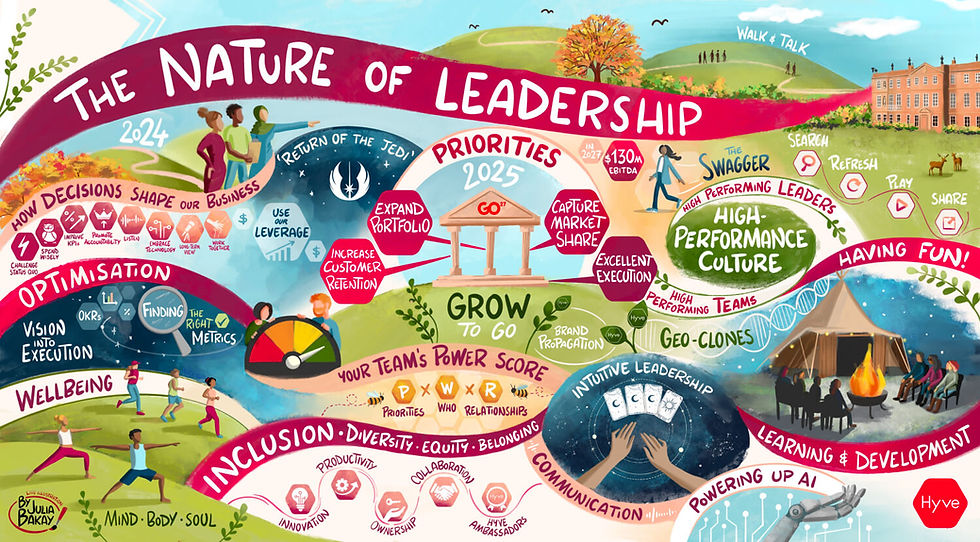
I call this a Visual Conference Summary. If you’d like to learn more about this approach, please visit this page:

Benefits of a Graphic Summary of your Conference Day(s)
Just one piece to send around to all attendees.
Easier to use for publicity — people who weren’t there can engage with it more easily.
Less modular, more big ideas connected. A visual storytelling of the day.
Stronger narrative flow across the entire event.
Clear takeaways distilled into one cohesive visual.
A polished, refined piece that can represent the event long after it’s over.
Graphic Recording Multiple Sessions on a Canvas
A brilliant golden mean; a way to capture it all, create an overview, and then crop individual sections for easy use and sharing on social media.

Benefits of Multiple Sessions Visual Notes per Canvas
We design the overview canvas with the future assets in mind (that’s why the sessions are often square-shaped).
You still have your day at a glance.
It’s a structured layout, which helps bring the event memories back to attendees long after it’s over.
Combines overview and detail in one coherent design.
Flexible for marketing, reporting, and internal communications.
Feels cohesive while still allowing each session its own space.

Which one would you like to try?
Get in touch to find the best graphic recording approach for your event!
To see what else is possible in the world of Graphic Recording, please read on.

